A monitor runs one check on a schedule from our probes and keeps the result. Six kinds cover most of a stack; each has its own idea of a target and of what passing means.
Types
| Type | Target | Passes when |
|---|---|---|
| HTTP(S) | A URL starting with http:// or https:// | The response is 2xx or 3xx, or every assertion holds. Up to 5 redirects are followed; bodies are capped at 5 MB. |
| TCP | host:port, IPv6 as [addr]:port | The connection handshake completes within the timeout. |
| Ping | A hostname or IP | An ICMP echo reply arrives. If ICMP is blocked, a TCP connection or refusal on 443, 80 or 22 counts as reachable. |
| DNS | A hostname (not an IP) | The resolver returns at least one A, AAAA or CNAME record. NXDOMAIN and empty answers are failures with different messages. |
| SSL expiry | A hostname, host:port or https:// URL | The certificate is trusted, matches the hostname and has not expired. Days left is recorded for reminders. |
| Heartbeat | None. We give you a URL your job pings. | A ping arrived within one and a half intervals. See Heartbeat monitors. |
Create a monitor
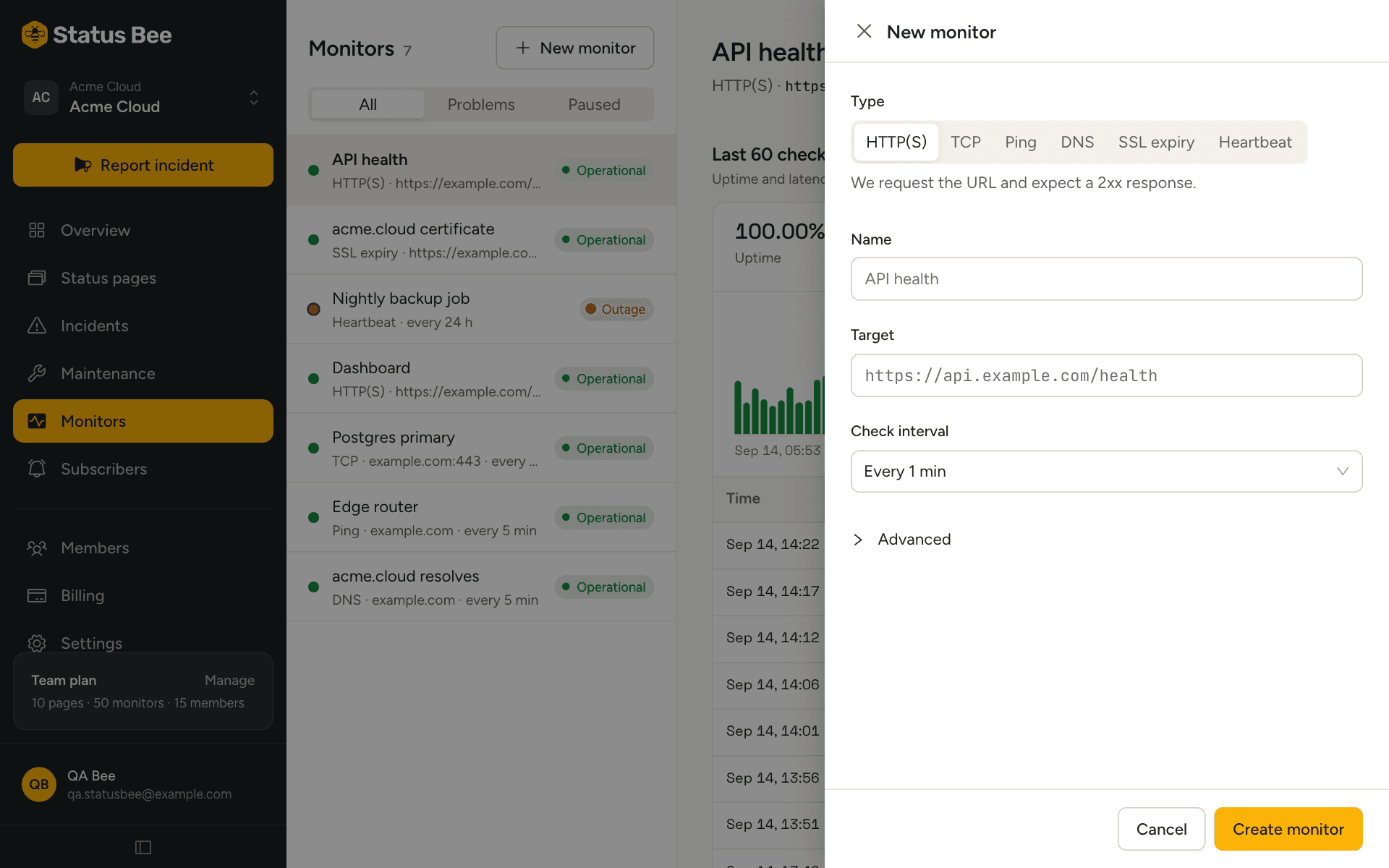
- Pick the type and paste the target
The target is checked as you save: a TCP monitor without a port, a DNS monitor given an IP address, or a hostname that resolves to a private range are rejected with a plain reason.
- Choose an interval
From 30 seconds to 24 hours. The floor depends on your plan: 5 minutes on Free, 1 minute on Starter, 30 seconds on Team and Business. Intervals below the floor are raised to it.
- Open Advanced when you need it
Assertions, timeout, and the failure and recovery thresholds.
Assertions (HTTP only)
| Assertion | Passes when |
|---|---|
| Status code | The response status equals the value exactly, for example 200. |
| Response time | The whole request takes less than the value, in milliseconds. |
| Body contains | The response body includes the string, for example "status":"ok". |
Without assertions any 2xx or 3xx passes. With a status code assertion, that code and only that code passes. Assertions combine with and: every one must hold.
Thresholds
Failure threshold is how many consecutive failed checks mark the monitor down; recovery threshold is how many consecutive passes mark it up again. Both default to 2 and go from 1 to 10. Two and two means a single dropped packet does not page anyone, and a single lucky response does not declare victory. A brand-new monitor is Pending until its first pass, which brings it up immediately.
Reading a monitor
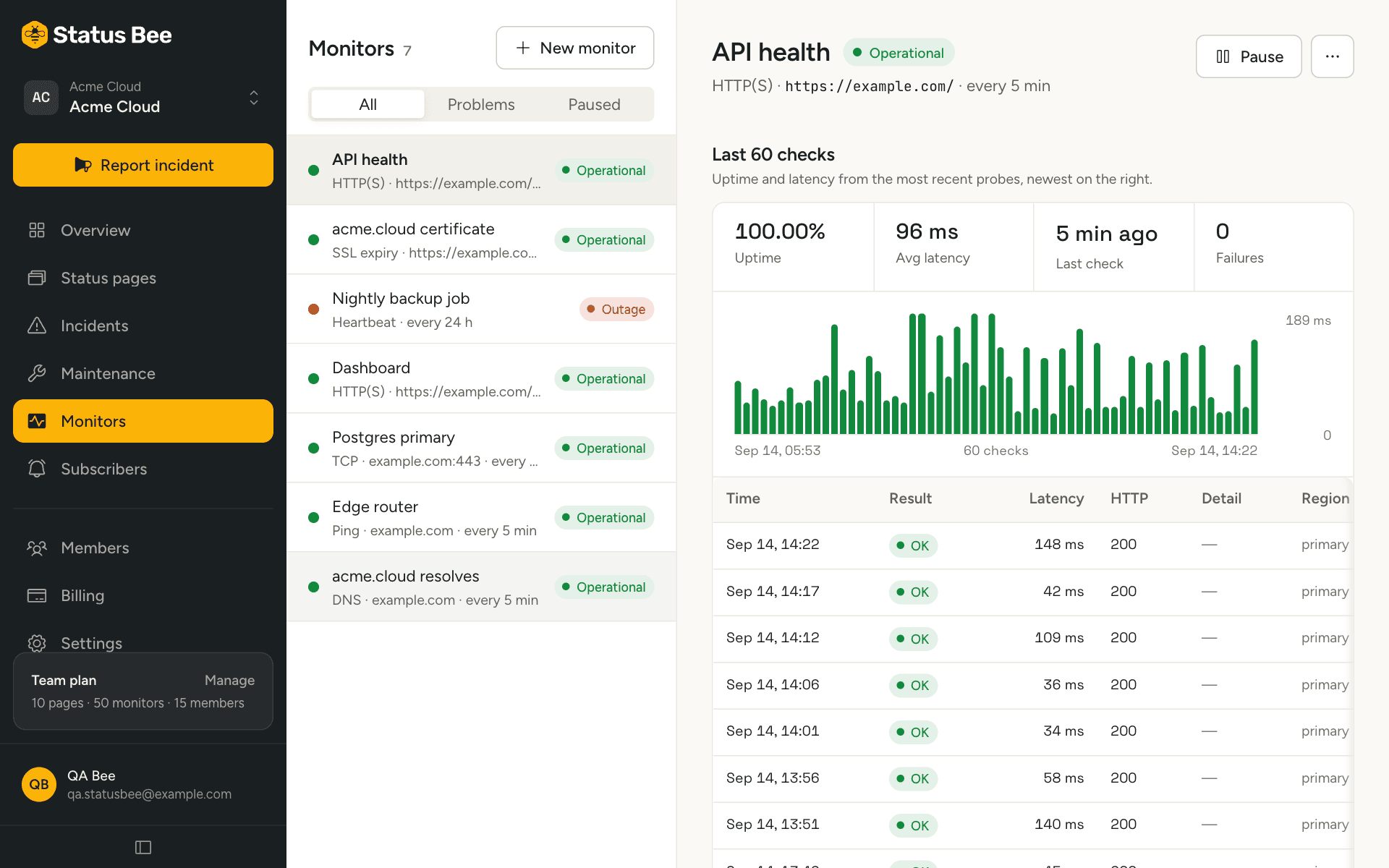
The detail shows uptime and average latency over the last 60 checks, a latency chart, and the check log with each result's time, region, latency and error text. Raw checks are kept for 30 days; daily rollups feed the status page's uptime strip beyond that.
Pause and resume
Pausing stops checks and shows the monitor as Paused; it no longer affects components. Resuming resets the counters and runs a check straight away. Pause a monitor before planned work on its target if it is not covered by a maintenance window.
Limits
Plans set the number of monitors per organisation (1 on Free, 15 on Starter, 50 on Team, 100 on Business) and the fastest interval. Reaching the limit answers with an upgrade prompt.
API
Monitors are CRUD on /user/monitors, with /pause, /resume, /checks and PUT /user/monitors/:id/rules. See Monitors in the API reference.